

 About Us
Prowler generates security assessment reports in multiple formats, ensuring compatibility with various analysis tools and AWS integrations.Documentation Index
Fetch the complete documentation index at: https://prowler-prowler-1359-docs-improve-developer-documentation-f.mintlify.app/llms.txt
Use this file to discover all available pages before exploring further.
Default Report Generation
By default, Prowler outputs reports in CSV and JSON-OCSF formats:-M/--output-modes/--output-formats flag, as in the following example:
Compliance Reports
All compliance-related reports are automatically generated when Prowler is executed. These outputs are stored in the/output/compliance directory.
Custom Output Flags
By default, Prowler creates a file inside theoutput directory named: prowler-output-ACCOUNT_NUM-OUTPUT_DATE.format.
However, both the output file name and directory can be personalised:
- Custom output report name:
-F/--output-filename
- Custom output directory:
-o/--output-directory
Both flags can be used simultaneously to provide a custom directory and filename.
console prowler <provider> -M csv json-ocsf json-asff \ -F <custom_report_name> -o <custom_report_directory>Output timestamp format
By default, the timestamp format of the output files is ISO 8601. This can be changed with the flag--unix-timestamp generating the timestamp fields in pure unix timestamp format.
Supported Output Formats
Prowler natively supports the following reporting output formats:- CSV
- JSON-OCSF
- JSON-ASFF (AWS only)
- HTML
- SARIF (IaC only)
CSV
The CSV format follows a standardized structure across all providers. The following are the available columns:- AUTH_METHOD
- TIMESTAMP
- ACCOUNT_UID
- ACCOUNT_NAME
- ACCOUNT_EMAIL
- ACCOUNT_ORGANIZATION_UID
- ACCOUNT_ORGANIZATION_NAME
- ACCOUNT_TAGS
- FINDING_UID
- PROVIDER
- CHECK_ID
- CHECK_TITLE
- CHECK_TYPE
- STATUS
- STATUS_EXTENDED
- MUTED
- SERVICE_NAME
- SUBSERVICE_NAME
- SEVERITY
- RESOURCE_TYPE
- RESOURCE_UID
- RESOURCE_NAME
- RESOURCE_DETAILS
- RESOURCE_TAGS
- PARTITION
- REGION
- DESCRIPTION
- RISK
- RELATED_URL
- REMEDIATION_RECOMMENDATION_TEXT
- REMEDIATION_RECOMMENDATION_URL
- REMEDIATION_CODE_NATIVEIAC
- REMEDIATION_CODE_TERRAFORM
- REMEDIATION_CODE_CLI
- REMEDIATION_CODE_OTHER
- COMPLIANCE
- CATEGORIES
- DEPENDS_ON
- RELATED_TO
- NOTES
- PROWLER_VERSION
- ADDITIONAL_URLS
CSV Headers Mapping
The following table shows the mapping between the CSV headers and the the providers fields:| Open Source Consolidated | AWS | GCP | AZURE | KUBERNETES |
|---|---|---|---|---|
| auth_method | profile | principal | identity_type : identity_id | in-cluster/kube-config |
| provider | provider | provider | provider | provider |
| account_uid | account_id / account_arn | project_id | subscription_id | cluster |
| account_name | account_name | project_name | subscription_name | context:context |
| account_email | account_email | N/A | N/A | N/A |
| account_organization_uid | account_organizations_arn | project_organization_id | tenant_id | N/A |
| account_organization_name | account_org | project_organization_display_name | tenant_domain | N/A |
| account_tags | account_tags | project_labels | subscription_tags | N/A |
| partition | partition | N/A | region_config.name | N/A |
| region | region | location | location | namespace:namespace |
| resource_name | resource_id | resource_name | resource_name | resource_name |
| resource_uid | resource_arn | resource_id | resource_id | resource_id |
| finding_uid | finding_unique_id | finding_unique_id | finding_unique_id | finding_unique_id |
JSON-OCSF
The JSON-OCSF output format implements the Detection Finding from the OCSFEach finding is a
json object within a list.JSON-ASFF (AWS Only)
Only available when using
--security-hub or --output-formats json-asff with the AWS provider.Each finding is a
json object within a list.HTML
The following image is an example of the HTML output: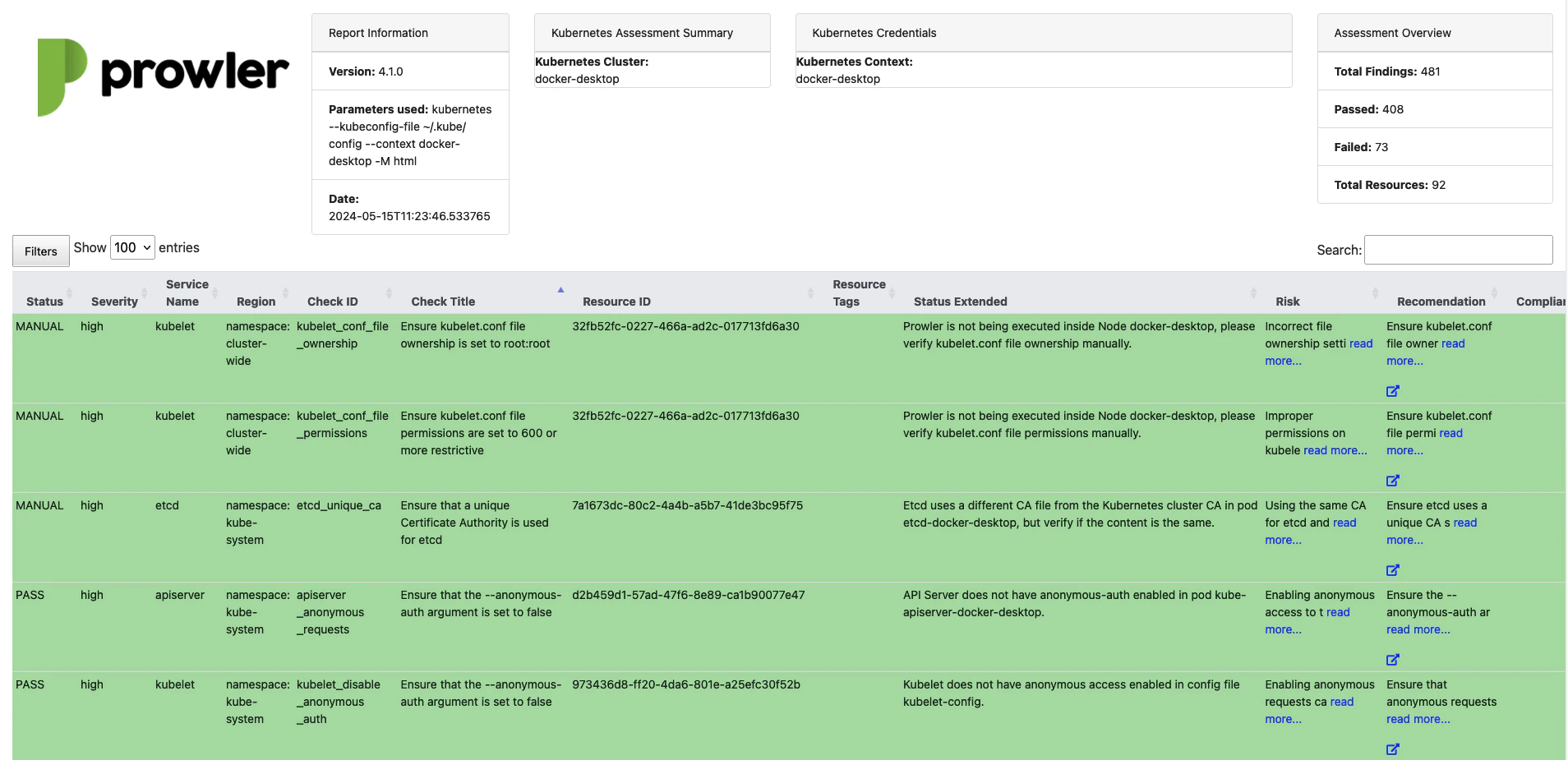
SARIF (IaC Only)
The SARIF (Static Analysis Results Interchange Format) output generates a SARIF 2.1.0 document compatible with GitHub Code Scanning and other SARIF-compatible tools. This format is exclusively available for the IaC provider, as it is designed for static analysis results that reference specific files and line numbers.The SARIF output format is only available when using the
iac provider. Attempting to use it with other providers results in an error.- Rules: Each unique check ID produces a rule entry with severity, description, remediation, and a markdown help panel.
- Results: Only failed (non-muted) findings are included, with file paths and line numbers for precise annotation.
- Severity mapping: Prowler severities map to SARIF levels (
critical/high→error,medium→warning,low/informational→note).
V4 Deprecations
Some deprecations have been made to unify formats and improve outputs.JSON
Native JSON format has been deprecated in favor of JSON OCSFv1.1.0.
The following is the mapping between the native JSON and the Detection Finding from the JSON-OCSF:
| Native JSON Prowler v3 | JSON-OCSF v.1.1.0 |
|---|---|
| AssessmentStartTime | time_dt |
| FindingUniqueId | finding_info.uid |
| Provider | cloud.provider |
| CheckID | metadata.event_code |
| CheckTitle | finding_info.title |
| CheckType | finding_info.types |
| ServiceName | resources.group.name |
| SubServiceName | Not mapped yet |
| Status | status_code |
| StatusExtended | status_detail |
| Severity | severity |
| ResourceType | resources.type |
| ResourceDetails | resources.data.details |
| Description | finding_info.desc |
| Risk | risk_details |
| RelatedUrl | unmapped.related_url |
| Remediation.Recommendation.Text | remediation.desc |
| Remediation.Recommendation.Url | remediation.references |
| Remediation.Code.NativeIaC | remediation.references |
| Remediation.Code.Terraform | remediation.references |
| Remediation.Code.CLI | remediation.references |
| Remediation.Code.Other | remediation.references |
| Compliance | unmapped.compliance |
| Categories | unmapped.categories |
| DependsOn | unmapped.depends_on |
| RelatedTo | unmapped.related_to |
| AdditionalURLs | unmapped.additional_urls |
| Notes | unmapped.notes |
| Profile | Not mapped yet |
| AccountId | cloud.account.uid |
| OrganizationsInfo.account_name | cloud.account.name |
| OrganizationsInfo.account_email | Not mapped yet |
| OrganizationsInfo.account_arn | Not mapped yet |
| OrganizationsInfo.account_org | cloud.org.name |
| OrganizationsInfo.account_tags | cloud.account.labels |
| Region | resources.region |
| ResourceId | resources.name |
| ResourceArn | resources.uid |
| ResourceTags | resources.labels |
CSV Columns
In Prowler v3 each provider had some specific columns, different from the rest. These are the cases that have changed in Prowler v4:| Provider | v3 | v4 |
|---|---|---|
| AWS | PROFILE | AUTH_METHOD |
| AWS | ACCOUNT_ID | ACCOUNT_UID |
| AWS | ACCOUNT_ORGANIZATION_ARN | ACCOUNT_ORGANIZATION_UID |
| AWS | ACCOUNT_ORG | ACCOUNT_ORGANIZATION_NAME |
| AWS | FINDING_UNIQUE_ID | FINDING_UID |
| AWS | ASSESSMENT_START_TIME | TIMESTAMP |
| AZURE | TENANT_DOMAIN | ACCOUNT_ORGANIZATION_NAME |
| AZURE | SUBSCRIPTION | ACCOUNT_UID |
| GCP | PROJECT_ID | ACCOUNT_UID |
| GCP | LOCATION | REGION |
| AWS / AZURE / GCP | RESOURCE_ID | RESOURCE_NAME |
| AWS / AZURE / GCP | RESOURCE_ARN | RESOURCE_UID |